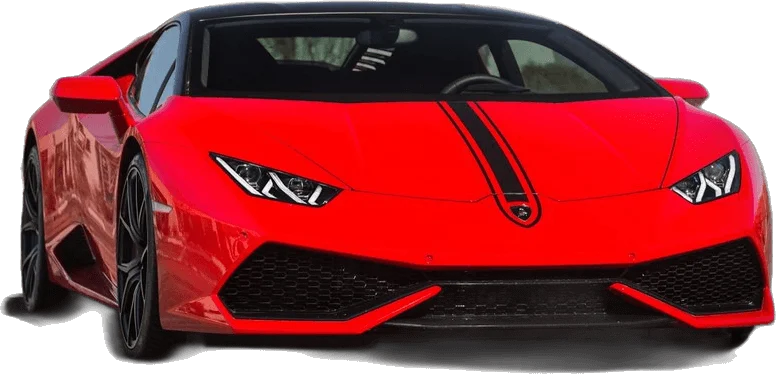
The uno reverse car transition ai trend is posted the same way on every platform: a silent AI clip of about 12 seconds, uploaded vertically, with the trending "Unforgettable" sound attached inside the app and the AI label switched on. The clip is the easy part now. In the four days after the most-watched tutorial went up and passed roughly 20,000 views, we counted more than 20 near-identical how-to videos on YouTube alone, most of them aimed at Instagram Reels.
Key Takeaways:
- The trend is centered on Instagram Reels and TikTok, with YouTube acting as the tutorial layer where prompts get passed around.
- Export 9:16 for Reels, TikTok and Shorts. The reference clip everyone copies is 16:9, so vertical is a choice you have to make on purpose.
- Keep the file silent and add the sound in-app. That is how your post joins the sound's feed, and it keeps licensed music out of your export.
- Turn on the AI label. TikTok, Instagram and YouTube each have a disclosure setting for realistic AI video, and this clip qualifies.
- Only use your own face or a consenting adult's, and describe cars generically instead of leaning on brand names and badges.
Where the trend actually lives
The format has two layers, and it helps to know which one you are posting into.
The performance layer is short video: a person flashes two cards showing 2 and 4 at the lens, the hand sweeps away, and a car is suddenly parked behind them. That lives on Instagram Reels and TikTok. Template libraries have followed. One template marketplace page for the reverse card transition listed 40 related templates when we checked, running from 7 seconds to a little over a minute.
The tutorial layer is YouTube. Here the videos are 1 to 5 minutes long, explain which AI tool to use, and link a prompt. Their titles are almost interchangeable, built from the same string of phrases: "trending AI video editing prompt", "Unforgettable song", "UNO reverse car transition". Several put "Instagram trending" first, which tells you where their viewers intend to post.
For you, that means two things. Reels and TikTok are where a finished clip belongs. And the people searching YouTube are not your audience for the clip itself. They are looking for the method, which is what our how-to guide is for.
What this proved: post the clip to short-video feeds, not to search. What it left unsolved: the clip most people start from is the wrong shape for those feeds.
Choosing 9:16 or 16:9 before you render
When we pulled apart the reference video that circulates with the prompt, it measured 1920x1080 at 30 fps, 12 seconds long. That is a landscape frame. Feed it to a model with the aspect ratio left on automatic and you get a landscape result, which Reels and TikTok will shrink into the middle of the screen with bars above and below.
Decide the shape before generating, because cropping afterward usually costs you the car.
| Destination | Aspect ratio | Why |
|---|---|---|
| Instagram Reels | 9:16 | Full-screen vertical feed |
| TikTok | 9:16 | Full-screen vertical feed |
| YouTube Shorts | 9:16 | Shorts shelf expects vertical |
| Standard YouTube video, X, desktop embeds | 16:9 | Matches the reference framing exactly |
Other guides agree on vertical for this format. LightX's walkthrough recommends 9:16 and a 5 to 10 second length. We prefer the full 12 seconds because it keeps the second card flash at the end, but if you trim, cut the talking beat in the middle and keep the reveal intact.
Here is a hypothetical to make the cost concrete. Say you render in 16:9 and crop to vertical in an editor. A vertical crop of a 1920x1080 frame keeps a strip only about 608 pixels wide. If you are centered and the car is parked off your shoulder, as it is in the reference, most of the car falls outside that strip. You post a reveal where the thing being revealed is a fender.
On our generator, the car style pages are framed for vertical output so the whole car stays in shot.
What this proved: aspect ratio is a pre-render decision. What it left unsolved: a vertical clip with no sound is still only half a post.
Adding the sound in-app instead of baking it in
The clip should leave the AI tool silent. Then you attach the trending "Unforgettable" sound from the platform's own library when you post. There are three practical reasons.
- Discovery. On TikTok and Reels, a post that uses a library sound is grouped with every other post using it. A track baked into your video file is treated as original audio and misses that grouping.
- Licensing. The platforms license music for use inside their apps. A music file mixed into your export and uploaded as your own audio is a different situation, and it is the kind of thing that gets a video muted.
- Sync. The moment that sells the effect is the hand sweep, which in the reference timing lands at about 4.5 seconds. With the sound added in-app you can slide the clip against the track until the sweep hits the beat.
The original tutorial's shared folder includes a short audio file alongside the prompt and reference video. We would leave it there. Use it as a timing guide if you like, and let the app supply the real sound. For the same reason our tool only outputs silent MP4s, and the model request has audio generation turned off so there is no invented background noise to clean up.
What this proved: silent export plus in-app sound gives you reach, cleaner rights and better sync. What it left unsolved: what to write underneath it.
Captions and hashtags seen on real posts
We read the titles, descriptions and tags on the tutorials that surfaced in our search. Patterns worth knowing:
- Long descriptive tags. The leading tutorial uses tags such as
#unoreversecartrendedit,#aivideoeditingpromptand#trendingvideoediting. They read like search queries because they are. - The song name does heavy lifting. "Unforgettable" appears in most titles, often before the word "car". People find the trend through the sound.
- "24" shows up as shorthand. A few titles call it the "24 song" trend, after the two cards.
- "Instagram trending" is a common prefix, which again points at Reels as the home feed.
For a performance post, as opposed to a tutorial, shorter works better. A caption that names the car you picked, plus three to five tags mixing the trend name, the sound and one niche of your own (your city, your car scene, your sport), is plenty. If you made the clip with AI, saying so in the caption is a good habit even with the label on. Comments on this trend tend to ask "which app?" anyway, so the answer is engagement you were going to get either way.
Avoid tagging car makers or implying the car is yours if it is not. That leads to the two sections that matter most.
What this proved: the sound and the trend name carry discovery, so the caption can be short. What it left unsolved: the label the platforms expect on a clip like this.
Turning on the AI label on each platform
This clip is realistic footage of a real person, standing next to a car that was never there. That is squarely the kind of content platforms want labeled.
TikTok. TikTok introduced a creator label for AI-generated content in September 2023 and says its policy requires people to label AI-generated content that contains realistic images, audio or video. The label can be applied to anything completely generated or significantly edited by AI. Switch it on in the post settings before publishing.
Instagram. Meta's label is called "AI info". According to Meta's own explanation of its approach, it is applied when Meta detects industry-standard AI signals in a file or when the person uploading discloses it. You can self-disclose during upload, and you should, since a fully generated clip is exactly the case where the visible label is meant to stay on the post.
YouTube. In YouTube Studio the upload flow asks about AI use. YouTube's disclosure policy lists realistic scenes that never happened, and content that makes a real person appear to do something they did not do, as requiring disclosure. YouTube also states that disclosing does not limit a video's reach or monetization eligibility, and that repeated failure to disclose can lead to penalties.
A mini case from our own notes: the tutorials driving this trend are openly about AI. The words "AI video editing" sit in nearly every title we logged. Nobody watching is fooled, and the videos still pull views. Labeling a clip in a trend that is known to be AI costs you nothing.
What this proved: all three platforms have a switch, and this clip belongs behind it. What it left unsolved: whose face is in the clip.
Likeness and consent
The mechanic of this trend is replacing the person in a reference video with someone from a photo. Used on yourself, that is a fun edit. Used on someone else without asking, it is a realistic video of a real person doing something they never did.
Simple rules cover almost every case:
- Your own face: fine.
- A friend or family member: ask first, and show them the result before posting.
- Celebrities, public figures, strangers: do not.
- Anyone under 18: do not.
Now a failure scenario, hypothetical but easy to picture. Say someone drops a classmate's profile photo into the tool as a joke and posts the result with a caption implying the car is real. The classmate reports it. The post is unlabeled, realistic and made without consent, which checks every box the platform policies above describe. The likely end of that story is a removed video and a strike on the poster's account, plus a friendship that is harder to restore than the account.
Our generator asks you to confirm the photo is you or someone who agreed, and that they are an adult. That checkbox is not decoration.
What this proved: consent is the line between an edit and a problem. What it left unsolved: the other names in the frame, namely the cards and the car.
Car brands, card brands and common sense
Two sets of trademarks hover around this trend.
The cards. UNO is a trademark of Mattel, and neither the trend nor this site is affiliated with Mattel. Creators call it the "UNO reverse" trend because the cards look like the ones from the game. In captions, "UNO-style cards" or "two cards showing 2 and 4" describes the look without claiming anything official.
The cars. Viewers love guessing the model, and naming the kind of car you chose is normal. Where it goes wrong is implying endorsement or ownership. A few habits keep you clear:
- Pick a car template by class and color ("dark red track-focused coupe") and let the look speak. Generated badges are often misspelled anyway, which reads as sloppy.
- Do not tag a car maker's account as if they were involved.
- If you are a dealer, a detailer or a brand yourself, do not present an AI-generated car as stock you actually have.
- If someone asks whether the car is yours, the honest answer plays better in comments than getting caught.
We built the style presets on this site around that idea. The red supercar and muscle car looks are original descriptions of a body style, not copies of a specific production model. For background on how the format started and why the cards are part of it, see the trend explainer.
What this proved: generic descriptions look cleaner and keep you out of endorsement territory. What it left unsolved: nothing that a quick pre-post check cannot catch.
A pre-post checklist
Run through this before you hit publish.
- Shape: 9:16 for Reels, TikTok and Shorts. Car fully in frame after the reveal.
- Length: about 12 seconds, or trimmed by removing the middle talking beat.
- Audio: file is silent. Trending sound attached from the app's library.
- Sync: hand sweep lands on the beat. Slide the clip, not the sound.
- Cards: numbers read as 2 and 4 in both appearances.
- Label: AI disclosure switched on for the platform you are posting to.
- Likeness: your face, or a consenting adult's.
- Caption: trend name, the sound, one niche tag of your own. No car maker tags that imply a partnership.
If any of the first five fail, re-render before you post. Fixing a weak clip in the caption does not work.
What this proved: eight checks cover the whole post. What it left unsolved: trends move quickly, so the sound and tags that work this week are worth rechecking next week.
Frequently Asked Questions
Should I post the UNO reverse car transition in 9:16 or 16:9?
Use 9:16 for Instagram Reels, TikTok and YouTube Shorts. The reference clip most people copy is 16:9, so set vertical output before rendering. Cropping a landscape render to vertical usually cuts the car out of the frame.
Should the AI video include the song?
No. Export a silent clip and add the trending "Unforgettable" sound from the app's own library when you post. Your video then appears with other posts using that sound, and licensed music stays out of your exported file.
Do I need to label the video as AI-generated?
Yes. It is realistic footage of a real person with a car that was never there. TikTok, Instagram and YouTube each provide a disclosure setting for realistic AI content, and YouTube states that disclosure does not limit reach or monetization eligibility.
Can I make the video with a friend's photo?
Only with their permission, and only if they are an adult. Show them the result before posting. Do not use photos of celebrities, public figures, strangers or minors.
Can I name the car brand in my caption?
Naming the type of car is normal. Avoid tagging a car maker as if they were involved, and do not imply you own a car that was generated. Our car templates use generic designs, which also tend to render with fewer garbled badges.
Sources
- Trending Ai Video Editing prompt | Unforgettable song | UNO Reverse Car Transition Ai Video Editing (Jayanta Bhai, YouTube)
- Uno Reverse Card Transition Trend templates (Pippit)
- How to Make an Unforgettable AI Video (LightX)
- New labels for disclosing AI-generated content (TikTok Newsroom)
- Our Approach to Labeling AI-Generated Content and Manipulated Media (Meta)
- Disclosing use of altered or synthetic content (YouTube Help)